Product Meta

  • product_code: WS-1032P
  • product_editor_4418_tab_content: <span style="color: #000000;"><strong><span style="font-size: 14px;">Centralized AP Management for Enterprises</span></strong></span> <span style="font-size: 14px;">PLANET WS-1032P Wireless AP Managed Switch helps service providers and IT managers control all wireless APs at the same time. The WS-1032P enables administrators to effectively manage various wireless access points deployed in different locations. The administrator can automatically discover, configure, update and monitor all the managed APs through one single browser-based web user interface. Such design avoids the need to configure the wireless APs one by one.</span> <span style="font-size: 14px;"> </span> <p style="text-align: center;"><span style="font-size: 14px;"><img src="https://mazen-temporary.360elevate.co/wp-content/uploads/2025/01/WS-1032P-101.png" alt="" width="700" height="520" /> </span></p>   <strong><span style="font-size: 14px; color: #000000;">Cost-effective PoE Management Solution with Smart AP Control</span></strong> <span style="font-size: 14px;">The WS-1032P, providing eight 10/100/1000BASE-T PoE ports, in-line power interfaces and two 10 Gigabit SFP+ interfaces, is capable of building a secure and highly-efficient managed wireless network for the enterprises. For instance, it can work with the RADIUS Server to perform comprehensive security for wireless user authentication with powered APs.</span>   <p style="text-align: center;"><img src="https://mazen-temporary.360elevate.co/wp-content/uploads/2025/01/WS-1032P-111.png" alt="" width="700" height="723" /></p>
  • product_editor_4418_tab_enabled: yes
  • product_editor_4418_tab_content_changed: yes
  • product_editor_4418_tab_title: Applications
  • product_editor_4421_tab_content: <span style="color: #000000;"><strong><span style="font-size: 14px;">Physical Port</span></strong></span> <ul> <li><span style="font-size: 14px;"><span style="color: #000000;"><strong>8-port 10/100/1000BASE-T</strong></span> with 36W PoE injector</span></li> <li><span style="font-size: 14px;"><span style="color: #000000;"><strong>2-port 1/2.5/10GBASE-X</strong></span> SFP+</span></li> <li><span style="font-size: 14px;">RS232 RJ45 console interface for switch basic management and setup</span></li> </ul> <span style="font-size: 14px;"> </span> <span style="color: #000000;"><strong><span style="font-size: 14px;">Wireless LAN AP Management</span></strong></span> <ul> <li><span style="font-size: 14px;">Dashboard: provides at-a-glance view of system and wireless network status</span></li> <li><span style="font-size: 14px;">AP Discovery: one key to discover the managed APs on the managed LAN</span></li> <li><span style="font-size: 14px;">Customized Profile: allows multiple wireless profiles creation and maintenance</span></li> <li><span style="font-size: 14px;">Auto Provision: multi-AP provisioning with one click</span></li> <li><span style="font-size: 14px;">Cluster Management: simplifies high-density AP management</span></li> <li><span style="font-size: 14px;">Zone Plan: optimizes AP deployment with actual signal coverage</span></li> <li><span style="font-size: 14px;">Analysis: real-time AP status monitoring</span></li> <li><span style="font-size: 14px;">Scalability: free system upgrade and AP firmware bulk upgrade capability</span></li> </ul> <span style="font-size: 14px;"> </span> <span style="color: #000000;"><strong><span style="font-size: 14px;">Power over Ethernet</span></strong></span> <ul> <li><span style="font-size: 14px;">Up to 8 ports of IEEE 802.3af/802.3at devices powered</span></li> <li><span style="font-size: 14px;">Supports PoE Power up to 36 watts for each PoE port</span></li> <li><span style="font-size: 14px;">Auto detects powered device (PD)</span></li> <li><span style="font-size: 14px;">Circuit protection prevents power interference between ports</span></li> <li><span style="font-size: 14px;">Remote power feeding up to 100 meters</span></li> <li><span style="font-size: 14px;">PoE management features</span> <ul> <li><span style="font-size: 14px;">Total PoE power budget control</span></li> <li><span style="font-size: 14px;">Per port PoE function enable/disable</span></li> <li><span style="font-size: 14px;">PoE admin-mode control </span></li> <li><span style="font-size: 14px;">PoE port power feeding priority</span></li> <li><span style="font-size: 14px;">Per PoE port power limit</span></li> <li><span style="font-size: 14px;">PD classification detection</span></li> </ul> </li> <li><span style="font-size: 14px;">Intelligent PoE features</span> <ul> <li><span style="font-size: 14px;">Temperature threshold control</span></li> <li><span style="font-size: 14px;">PoE usage threshold control</span></li> <li><span style="font-size: 14px;">PD alive check</span></li> <li><span style="font-size: 14px;">PoE schedule</span></li> </ul> </li> </ul> <span style="font-size: 14px;"> </span> <strong><span style="font-size: 14px; color: #000000;">Layer 3 IP Routing Features</span></strong> <ul> <li><span style="font-size: 14px;">IP dynamic routing protocol supports RIPv2, OSPFv2 and OSPFv3</span></li> <li><span style="font-size: 14px;">IPv4/IPv6 hardware static routing</span></li> <li><span style="font-size: 14px;">Routing interface provides per VLAN routing mode</span></li> </ul> <span style="font-size: 14px;"> </span> <span style="color: #000000;"><strong><span style="font-size: 14px;">Layer2 Features</span></strong></span> <ul> <li><span style="font-size: 14px;">High performance of Store-and-Forward architecture and runt/CRC filtering eliminates erroneous packets to optimize the network bandwidth</span></li> <li><span style="font-size: 14px;">Storm Control support</span> <ul> <li><span style="font-size: 14px;">Broadcast/Multicast/Unknown unicast</span></li> </ul> </li> <li><span style="font-size: 14px;">Supports <strong>VLAN</strong></span> <ul> <li><span style="font-size: 14px;">IEEE 802.1Q tagged VLAN</span></li> <li><span style="font-size: 14px;">Supports provider bridging (VLAN Q-in-Q, IEEE 802.1ad) </span></li> <li><span style="font-size: 14px;">Private VLAN Edge (PVE)</span></li> <li><span style="font-size: 14px;">Protocol-based VLAN</span></li> <li><span style="font-size: 14px;">MAC-based VLAN</span></li> <li><span style="font-size: 14px;">Voice VLAN</span></li> <li><span style="font-size: 14px;">GVRP(GARP VLAN Registration Protocol)</span></li> </ul> </li> <li><span style="font-size: 14px;">Supports</span><strong><span style="font-size: 14px;"> Spanning Tree Protocol</span></strong> <ul> <li><span style="font-size: 14px;">STP, IEEE 802.1D Spanning Tree Protocol</span></li> <li><span style="font-size: 14px;">RSTP, IEEE 802.1w Rapid Spanning Tree Protocol</span></li> <li><span style="font-size: 14px;">MSTP, IEEE 802.1s Multiple Spanning Tree Protocol, spanning tree by VLAN</span></li> <li><span style="font-size: 14px;">BPDU Guard</span></li> </ul> </li> <li><span style="font-size: 14px;">Supports <span style="color: #000000;"><strong>Link Aggregation</strong></span></span> <ul> <li><span style="font-size: 14px;">802.3ad Link Aggregation Control Protocol(LACP)</span></li> <li><span style="font-size: 14px;">Cisco ether-channel (static trunk)</span></li> <li><span style="font-size: 14px;">Maximum 5 trunk groups, up to 10 ports per trunk group</span></li> <li><span style="font-size: 14px;">Up to 56Gbps bandwidth (full duplex mode)</span></li> </ul> </li> <li><span style="font-size: 14px;">Provide sport mirror (many-to-1)</span></li> <li><span style="font-size: 14px;">Port mirroring to monitor the incoming or outgoing traffic on a particular port</span></li> <li><span style="font-size: 14px;">Loop protection to avoid broadcast loops</span></li> <li><span style="font-size: 14px;">Link Layer Discovery Protocol (LLDP)</span></li> <li><span style="font-size: 14px;">Compatible with Cisco uni-directional link detection (UDLD) that monitors a link between two switches and blocks the ports on both ends of the link if the link fails at any point between the two devices</span></li> <li><span style="font-size: 14px;">Supports G.8032 ERPS (Ethernet Ring Protection Switching)</span></li> </ul> <span style="font-size: 14px;"> </span> <span style="color: #000000;"><strong><span style="font-size: 14px;">Quality of Service</span></strong></span> <ul> <li><span style="font-size: 14px;">Ingress Shaper and Egress Rate Limit per port bandwidth control</span></li> <li><span style="font-size: 14px;">8 priority queues on all switch ports</span></li> <li><span style="font-size: 14px;">Traffic classification</span> <ul> <li><span style="font-size: 14px;">IEEE 802.1p CoS</span></li> <li><span style="font-size: 14px;">TOS/DSCP/IP Precedence of IPv4/IPv6 packets</span></li> <li><span style="font-size: 14px;">IP TCP/UDP port number</span></li> <li><span style="font-size: 14px;">Typical network application</span></li> </ul> </li> <li><span style="font-size: 14px;">Strict priority and Weighted Round Robin (WRR) CoS policies</span></li> <li><span style="font-size: 14px;">Supports QoS and In/Out bandwidth control on each port</span></li> <li><span style="font-size: 14px;">Traffic-policing policies on the switch port</span></li> <li><span style="font-size: 14px;">DSCP remarking </span></li> </ul> <span style="font-size: 14px;"> </span> <span style="color: #000000;"><strong><span style="font-size: 14px;">Multicast</span></strong></span> <ul> <li><span style="font-size: 14px;">Supports IPv4 IGMP Snooping v1, v2 and v3</span></li> <li><span style="font-size: 14px;">Supports IPv6 MLD Snooping v1 and v2</span></li> <li><span style="font-size: 14px;">Querier mode support</span></li> <li><span style="font-size: 14px;">IGMP Snooping port filtering</span></li> <li><span style="font-size: 14px;">MLD Snooping port filtering</span></li> <li><span style="font-size: 14px;">Multicast VLAN Registration (MVR) support</span></li> </ul> <span style="font-size: 14px;"> </span> <span style="color: #000000;"><strong><span style="font-size: 14px;">Security</span></strong></span> <ul> <li><span style="font-size: 14px;">Authentication</span> <ul> <li><span style="font-size: 14px;">IEEE 802.1x Port-based/MAC-based network access authentication</span></li> <li><span style="font-size: 14px;">Built-in RADIUS client to co-operate with the RADIUS servers</span></li> <li><span style="font-size: 14px;">TACACS+ login users access authentication</span></li> <li><span style="font-size: 14px;">RADIUS/TACACS+ users access authentication</span></li> </ul> </li> <li><span style="font-size: 14px;">Access Control List</span> <ul> <li><span style="font-size: 14px;">IP-based Access Control List (ACL)</span></li> <li><span style="font-size: 14px;">MAC-based Access Control List</span></li> </ul> </li> <li><span style="font-size: 14px;">Source MAC/IP address binding</span></li> <li><span style="font-size: 14px;"><span style="color: #000000;"><strong>DHCP Snooping</strong> </span>to filter un-trusted DHCP messages</span></li> <li><span style="font-size: 14px;"><span style="color: #000000;"><strong>Dynamic ARP Inspection</strong></span> discards ARP packets with invalid MAC address to IP address binding</span></li> <li><span style="font-size: 14px;">IP Source Guard prevents IP spoofing attacks</span></li> <li><span style="font-size: 14px;">Auto DoS rule to defend DoS attack</span></li> <li><span style="font-size: 14px;">IP address access management to prevent unauthorized intruder</span></li> </ul> <span style="font-size: 14px;"> </span> <span style="color: #000000;"><strong><span style="font-size: 14px;">Management</span></strong></span> <ul> <li><span style="font-size: 14px;">IPv4 and IPv6 dual stack management</span></li> <li><span style="font-size: 14px;">Switch Management Interfaces</span> <ul> <li><span style="font-size: 14px;">Console/Telnet Command Line Interface </span></li> <li><span style="font-size: 14px;">Web switch management</span></li> <li><span style="font-size: 14px;">SNMP v1, v2c, and v3 switch management</span></li> <li><span style="font-size: 14px;">SSHv2, TLSv1.2 secure access</span></li> </ul> </li> <li><span style="font-size: 14px;"><strong>IPv6</strong> IP Address/NTP/DNS management</span></li> <li><span style="font-size: 14px;">Built-in Trivial File Transfer Protocol (TFTP) client</span></li> <li><span style="font-size: 14px;">BOOTP and DHCP for IP address assignment</span></li> <li><span style="font-size: 14px;">System Maintenance</span> <ul> <li><span style="font-size: 14px;">Firmware upload/download via HTTP/TFTP</span></li> <li><span style="font-size: 14px;">Reset button for system reboot or reset to factory default</span></li> <li><span style="font-size: 14px;">Dual Images</span></li> </ul> </li> <li><span style="font-size: 14px;">DHCP Relay</span></li> <li><span style="font-size: 14px;">DHCP Option82</span></li> <li><span style="font-size: 14px;">User Privilege levels control</span></li> <li><span style="font-size: 14px;">NTP (Network Time Protocol)</span></li> <li><span style="font-size: 14px;">Link Layer Discovery Protocol (LLDP) and LLDP-MED</span></li> <li><span style="font-size: 14px;">Network Diagnostic</span> <ul> <li><span style="font-size: 14px;">SFP-DDM (Digital Diagnostic Monitor)</span></li> <li><span style="font-size: 14px;">ICMPv6/ICMPv4 Remote Ping</span></li> <li><span style="font-size: 14px;">Cable Diagnostic technology provides the mechanism to detect and report potential cabling issues</span></li> </ul> </li> <li><span style="font-size: 14px;">SMTP/Syslog remote alarm</span></li> <li><span style="font-size: 14px;">Four RMON groups (history, statistics, alarms and events) </span></li> <li><span style="font-size: 14px;">SNMP trap for interface Linkup and Linkdown notification</span></li> <li><span style="font-size: 14px;">System Log</span></li> <li><span style="font-size: 14px;">PLANET Smart Discovery Utility for deployment management</span></li> <li><span style="font-size: 14px;">PLANET UNI-NMS (Universal Network Management) and Smart Discovery Utility for deployment management</span></li> </ul>
  • product_editor_4421_tab_enabled: yes
  • product_editor_4421_tab_content_changed: yes
  • product_editor_4421_tab_title: Key Features
  • product_editor_4422_tab_content:   <div class="table-responsive"> <table class="common_table_sky" style="width: 100%;"> <thead> <tr> <th colspan="2">Hardware Specifications</th> </tr> </thead> <tbody> <tr> <td class="align-middle">Copper Ports</td> <td>8x 10/100/1000BASE-T RJ45 Auto-MDI/MDI-X interface with Port-1 to Port-8</td> </tr> <tr> <td class="align-middle">SFP Ports</td> <td>2 x 1G/2.5G/10G BASE-X SFP interfaces with Port-9 to Port-10</td> </tr> <tr> <td class="align-middle">PoE Injector Port</td> <td>8 ports with 802.3at/afPoE injector function with Port-1 to Port-8</td> </tr> <tr> <td class="align-middle">Console</td> <td>1 x RJ45 serial port (115200, 8, N, 1)</td> </tr> <tr> <td class="align-middle">Reset Button</td> <td>< 5 sec: System reboot > 5 sec: Factory default</td> </tr> <tr> <td class="align-middle">Power Requirements</td> <td>100~240V AC, 50/60Hz</td> </tr> <tr> <td class="align-middle">Power Consumption (Full Loading)</td> <td>Max. 14.8 watts/50.47BTU (Power on without any connection) Max. 162 watts/552.42BTU (Full loading with PoE+ function)</td> </tr> <tr> <td class="align-middle">ESD Protection</td> <td>6KV DC</td> </tr> <tr> <td class="align-middle">EFT Protection</td> <td>4KV</td> </tr> <tr> <td class="align-middle">Dimensions (W x D x H)</td> <td>330.2 x 153 x 44mm, 1U height</td> </tr> <tr> <td class="align-middle">Weight</td> <td>1.6 KG</td> </tr> <tr> <td class="align-middle">LED</td> <td><b>System:</b> R.O (<span style="color: green;"><b>Green</b></span>), Ring (<span style="color: green;"><b>Green</b></span>), SYS (<span style="color: green;"><b>Green</b></span>), PWR ((<span style="color: green;"><b>Green</b></span>) <b>10/100/1000BASE-T RJ45 Interfaces (Port 1 to Port 8):</b> 10/100/1000Mbps LNK/ACT (<span style="color: green;"><b>Green</b></span>) PoE-in-Use (<span style="color: orange;"><b>Amber</b></span>)(Port 1 to Port 8) <b>1/2.5/10G Mbps SFP+ Interfaces (Port 9 to Port 10):</b> 1G/2.5GLNK/ACT (<span style="color: green;"><b>Green</b></span>) 10G Mbps (<span style="color: orange;"><b>Amber</b></span>)</td> </tr> </tbody> <thead> <tr> <th colspan="2">Switching</th> </tr> </thead> <tbody> <tr> <td class="align-middle">Switch Architecture</td> <td>Store-and-Forward</td> </tr> <tr> <td class="align-middle">Switch Fabric</td> <td>56 Gbps/non-blocking</td> </tr> <tr> <td class="align-middle">Throughput</td> <td>41.67Mpps@ 64Bytes packet</td> </tr> <tr> <td class="align-middle">Address Table</td> <td>8K entries, automatic source address learning and aging</td> </tr> <tr> <td class="align-middle">Shared Data Buffer</td> <td>4.1Mbits</td> </tr> <tr> <td class="align-middle">Flow Control</td> <td>IEEE 802.3x pause frame for full duplex Back pressure for half duplex</td> </tr> <tr> <td class="align-middle">Jumbo Frame</td> <td>9KB</td> </tr> </tbody> <thead> <tr> <th colspan="2">Wireless APManagement</th> </tr> </thead> <tbody> <tr> <td class="align-middle">Maximum Managed APs</td> <td>32</td> </tr> <tr> <td class="align-middle">Maximum AP Groups</td> <td>10</td> </tr> <tr> <td class="align-middle">Maximum APs per AP Group</td> <td>32</td> </tr> <tr> <td class="align-middle">Wireless Encryption/Security</td> <td>WEP encryption security WPA Personal / Enterprise (TKIP / AES) WPA2 Personal / Enterprise (TKIP / AES) Enterprise Class 802.1x</td> </tr> <tr> <td class="align-middle">AP Auto Discovery</td> <td>Supports AP auto discovery</td> </tr> <tr> <td class="align-middle">Dashboard</td> <td>Summarized system overview includes online AP and activated client number</td> </tr> <tr> <td class="align-middle">SSID/RF Profile</td> <td>Allows multiple wireless profiles creation and maintenance</td> </tr> <tr> <td class="align-middle">Cluster Management</td> <td>Allows AP grouping for bulk provisioning and batch upgrading</td> </tr> <tr> <td class="align-middle">Bulk AP Provisioning</td> <td>Supports bulk AP provisioning with user-defined profiles</td> </tr> <tr> <td class="align-middle">Bulk AP Firmware Upgrade</td> <td>Supports bulk AP firmware upgrade</td> </tr> <tr> <td class="align-middle">Coverage Heat Map</td> <td>Enables real signal coverage of managed AP reflecting on the uploaded zone maps</td> </tr> <tr> <td class="align-middle">Status Monitoring</td> <td>Real-time traffic statistics reporting of AP and activated clients</td> </tr> <tr> <td class="align-middle">Graphical Statistics</td> <td>Real-time and historical visibility of traffic flow</td> </tr> <tr> <td class="align-middle">Profile Backup/Restoration</td> <td>Provides SSID, radio profile backup/restoration</td> </tr> <tr> <td class="align-middle">SSIDs-to-VLANs Mapping</td> <td>Allows to configure SSIDs-to-VLANs mapping in supported APs</td> </tr> </tbody> <thead> <tr> <th colspan="2">Supported Access Point Models[*]</th> </tr> </thead> <tbody> <tr> <td class="align-middle">Indoor AP</td> <td>IAP-1800AX IAP-2400AX WDAP-C7210E(V2) WDAP-C1800AX(V2) WDAP-W1800AXU WDAP-C7210E WDAP-W1200E WDAP-C7200E WDAP-W750E WNAP-C3220E WNAP-W2200UE</td> </tr> <tr> <td class="align-middle">Outdoor AP</td> <td>WDAP-1800AX WDAP-850AC WDAP-802AC WBS-512AC WBS-502N WBS-202N WAP-552N WAP-252N WDAP-702AC WBS-502AC WBS-500N WBS-200N WAP-500N WAP-200N</td> </tr> <tr> <td class="align-middle">[*] Remarks</td> <td>The supported AP models may be changed after a firmware upgrade.</td> </tr> </tbody> <thead> <tr> <th colspan="2">Power over Ethernet</th> </tr> </thead> <tbody> <tr> <td class="align-middle">PoE Standard</td> <td>IEEE 802.3atPoE Plus, PSE Backward compatible with IEEE 802.3af PoE PSE</td> </tr> <tr> <td class="align-middle">PoE Power Supply Type</td> <td>End-span</td> </tr> <tr> <td class="align-middle">PoE Power Output</td> <td>Per port 52V DC, max. 36watts</td> </tr> <tr> <td class="align-middle">Power Pin Assignment</td> <td>1/2(+), 3/6(-)</td> </tr> <tr> <td class="align-middle">PoE Power Budget</td> <td>120 watts (max.) @ 25 degrees C 100 watts (max.) @ 50 degrees C</td> </tr> <tr> <td class="align-middle">PoE Ability</td> <td>PD @ 7 watts: 8 units PD @15.4 watts : 7 units PD @ 30.8 watts: 3 units</td> </tr> </tbody> <thead> <tr> <th colspan="2">Layer 3 Functions</th> </tr> </thead> <tbody> <tr> <td class="align-middle">IP Interfaces</td> <td>Max. 128 VLAN interfaces</td> </tr> <tr> <td class="align-middle">Routing Table</td> <td>Max. 128 routing entries</td> </tr> <tr> <td class="align-middle">Routing Protocols</td> <td>IPv4 RIPv2 IPv4 OSPFv2 IPv6 OSPFv3 IPv4 hardware static routing IPv6 hardware static routing</td> </tr> </tbody> <thead> <tr> <th colspan="2">Layer 2 Management Functions</th> </tr> </thead> <tbody> <tr> <td class="align-middle">Port Configuration</td> <td>Port disable/enable Auto-negotiation 10/100/1000Mbps full and half duplex mode selection Flow Control disable/enable</td> </tr> <tr> <td class="align-middle">Port Status</td> <td>Display each port’s speed duplex mode, link status, flow control status, auto negotiation status, trunk status</td> </tr> <tr> <td class="align-middle">Port Mirroring</td> <td>TX/RX/Both Many-to-1 monitor Supports up to 5 sessions</td> </tr> <tr> <td class="align-middle">VLAN</td> <td>IEEE 802.1Q tag-based VLAN IEEE 802.1ad Q-in-Q tunneling Private VLAN Edge (PVE) MAC-based VLAN Protocol-based VLAN Voice VLAN MVR (Multicast VLAN Registration) Up to 4K VLAN groups, out of 4094 VLAN IDs</td> </tr> <tr> <td class="align-middle">Link Aggregation</td> <td>IEEE 802.3ad LACP/static trunk Supports 5 trunk groups with 10 ports per trunk</td> </tr> <tr> <td class="align-middle">IGMP Snooping</td> <td>IPv4 IGMP (v1/v2/v3) Snooping, up to 255 multicast groups IPv4 IGMP Querier mode support</td> </tr> <tr> <td class="align-middle">MLD Snooping</td> <td>IPv6 MLD (v1/v2) Snooping, up to 255 multicast groups IPv6 MLD Querier mode support</td> </tr> <tr> <td class="align-middle">Ring</td> <td>Supports ERPS, and complies with ITU-T G.8032 Recovery time < 10ms @ 3 nodes Recovery time <50ms @ 16 nodes Supports Major ring and sub-ring</td> </tr> <tr> <td class="align-middle">Access Control List</td> <td>IP-based ACL/MAC-based ACL Up to 256 entries</td> </tr> <tr> <td class="align-middle">Bandwidth Control</td> <td>Per port bandwidth control Ingress: 10Kbps~13000Mbps Egress: 10Kbps~13000Mbps</td> </tr> <tr> <td class="align-middle">QoS</td> <td>Traffic classification based, strict priority and WRR 8-level priority for switching Port number 802.1p priority 802.1Q VLAN tag DSCP/TOS field in IP packet</td> </tr> </tbody> <thead> <tr> <th colspan="2">Security Functions</th> </tr> </thead> <tbody> <tr> <td class="align-middle">Access Control List</td> <td>IP-based ACL/MAC-based ACL ACL based on: MAC Address IP Address Ethertype Protocol Type VLAN ID DSCP 802.1p Priority Up to 256 entries</td> </tr> <tr> <td class="align-middle">Security</td> <td>Port Security IP source guard Dynamic ARP inspection Command line authority control based on user level</td> </tr> <tr> <td class="align-middle">AAA</td> <td>RADIUS client TACACS+ client</td> </tr> <tr> <td class="align-middle">Network Access Control</td> <td>IEEE 802.1x port-based network access control MAC-based authentication Local/RADIUS authentication</td> </tr> </tbody> <thead> <tr> <th colspan="2">Switch Management</th> </tr> </thead> <tbody> <tr> <td class="align-middle">Basic Management Interfaces</td> <td>Console; Telnet Web browser SNMP v1, v2c</td> </tr> <tr> <td class="align-middle">Secure Management Interfaces</td> <td>SSHv2, TLSv1.2, SNMPv3</td> </tr> <tr> <td class="align-middle">System Management</td> <td>Firmware upgrade by HTTP protocol through Ethernet network Configuration upload/download through HTTP Remote Syslog System log LLDP protocol NTP PLANET Smart Discovery Utility PLANET CloudViewer app</td> </tr> <tr> <td class="align-middle">Event Management</td> <td>Remote Syslog Local System log SMTP</td> </tr> <tr> <td class="align-middle">SNMP MIBs</td> <td>RFC1213 MIB-II RFC 2863 IF-MIB RFC 1643 Ethernet MIB RFC2863 Interface MIB RFC2665 Ether-Like MIB RFC2737 Entity MIB RFC2819 RMON MIB (Groups 1, 2, 3 and 9) RFC2618 RADIUS Client MIB RFC3411SNMP-Frameworks-MIB IEEE802.1X PAE LLDP MAU-MIB Power over Ethernet MIB</td> </tr> </tbody> <thead> <tr> <th colspan="2">Standards Conformance</th> </tr> </thead> <tbody> <tr> <td class="align-middle">Regulatory Compliance</td> <td>FCC Part 15 Class A, CE</td> </tr> <tr> <td class="align-middle">Standards Compliance</td> <td>IEEE802.3 10BASE-T IEEE802.3u 100BASE-TX IEEE802.3z 1000BASE-SX/LX IEEE 802.3ab 1000BASE-T IEEE 802.3ae 10Gb/s Ethernet IEEE802.3x flow control and back pressure IEEE802.3ad port trunk with LACP IEEE802.1D Spanning Tree Protocol IEEE802.1w Rapid Spanning Tree Protocol IEEE 802.1s Multiple Spanning Tree Protocol IEEE802.1p Class of Service IEEE802.1Q VLAN tagging IEEE 802.1x Port Authentication Network Control IEEE 802.1ab LLDP IEEE 802.3af Power over Ethernet IEEE 802.3at Power over Ethernet Plus RFC 768 UDP RFC 793 TFTP RFC 791 IP RFC 792 ICMP RFC 2068 HTTP RFC 1112 IGMP v1 RFC 2236 IGMP v2 RFC 3376 IGMP v3 RFC 2710 MLD v1 RFC 3810 MLD v2 RFC 2328 OSPF v2 RFC 2453 RIP v2 ITU-T G.8032 ERPS Ring</td> </tr> </tbody> <thead> <tr> <th colspan="2">Environments</th> </tr> </thead> <tbody> <tr> <td class="align-middle">Operating</td> <td>Temperature: 0 ~ 50 degrees C Relative Humidity: 5 ~ 95% (non-condensing)</td> </tr> <tr> <td class="align-middle">Storage</td> <td>Temperature: -10 ~ 70degrees C Relative Humidity:5 ~ 95% (non-condensing)</td> </tr> </tbody> </table> </div>
  • product_editor_4422_tab_enabled: yes
  • product_editor_4422_tab_content_changed: yes
  • product_editor_4422_tab_title: Specifications
  • product_editor_4418_tab_sticky_width: pw-content-1
  • product_editor_4418_tab_sticky_position: pw-left-stick
  • product_editor_4421_tab_sticky_width: pw-content-1
  • product_editor_4421_tab_sticky_position: pw-left-stick
  • product_editor_4422_tab_sticky_width: pw-content-1
  • product_editor_4422_tab_sticky_position: pw-left-stick
  • product_editor_4423_tab_content:
  • product_editor_4423_tab_content_changed: yes
  • product_editor_4423_tab_enabled: yes
  • product_editor_4423_tab_title: Downloads
  • product_editor_4423_tab_sticky_width: pw-content-1
  • product_editor_4423_tab_sticky_height: 1
  • product_editor_4423_tab_sticky_position: pw-left-stick
  • product_editor_4424_tab_content:
  • product_editor_4424_tab_content_changed: yes
  • product_editor_4424_tab_enabled: yes
  • product_editor_4424_tab_title: Related Products
  • product_editor_4424_tab_sticky_width: pw-content-1
  • product_editor_4424_tab_sticky_height: 1
  • product_editor_4424_tab_sticky_position: pw-left-stick
  • total_sales: 0
  • product_label:
  • prouduct_loop_image_transparent_bg_:
  • 6_features_images: a:6:{i:0;s:5:"14314";i:1;s:5:"14317";i:2;s:5:"14315";i:3;s:5:"14313";i:4;s:5:"14312";i:5;s:5:"14311";}
  • datasheet_0_date: 20210813
  • datasheet_0_version: 1.0
  • datasheet_0_description: WS-1032P
  • datasheet_0_download_pdf: https://mazen-temporary.360elevate.co/storage/products/WS-1032P/C-WS-1032P_L.pdf
  • datasheet: 1
  • quick_guide_0_date: 20240830
  • quick_guide_0_version: 1.3
  • quick_guide_0_description: Added PSTI fuction.
  • quick_guide_0_download_pdf: https://mazen-temporary.360elevate.co/storage/products/WS-1032P/EMQ-WS-1032P_v1.3.pdf
  • quick_guide_1_date: 20210818
  • quick_guide_1_version: 1.0
  • quick_guide_1_description: Initial release.
  • quick_guide_1_download_pdf: https://mazen-temporary.360elevate.co/storage/products/WS-1032P/EMQ-WS-1032P_WS-2864PVR_v1.2.pdf
  • quick_guide: 2
  • users_manual_0_date: 20220422
  • users_manual_0_version: 1.1
  • users_manual_0_description: Initial release.
  • users_manual_0_download_pdf: https://mazen-temporary.360elevate.co/storage/products/WS-1032P/EM-WS%20series_v1.1.pdf
  • users_manual: 1
  • ec_declaration:
  • android_app:
  • driver:
  • firmware_0_date: 20240816
  • firmware_0_version: 1.2103240808
  • firmware_0_description: Function added: 1. After the AP profile is set, the IP can change to a fixed or DHCP IP. 2. Added AP control that supports WDAP-C3000AX, WDAP-3000AX and WDAP-W3000AX. 3. Supports serial number. 4. Added PSTI function. <b>FW upgrade for PSTIA</b> (Product Security and Telecommunications Infrastructure Act) <b>*Note:</b> After updating the firmware, you will need to enter the product's MAC code at the first login. Please record the MAC code before proceeding with the update.
  • firmware_0_download_pdf: https://mazen-temporary.360elevate.co/storage/products/WS-1032P/FW_WS-1032P_%20v1.2103b240808.zip
  • firmware_1_date: 20220422
  • firmware_1_version: 1.2103220407
  • firmware_1_description: AP controller support: IAP-1800AX, IAP-2400AX, and WDAP-W1800AXU.
  • firmware_1_download_pdf: https://mazen-temporary.360elevate.co/storage/products/WS-1032P/FW-WS-1032P_%20%20v1.2103b220407.zip
  • firmware_2_date: 20220114
  • firmware_2_version: 1.2103220111
  • firmware_2_description: (1) AP controller support: WDAP-C1800AX, WDAP-1800AX (2) Added etherleak patch.
  • firmware_2_download_pdf: https://mazen-temporary.360elevate.co/storage/products/WS-1032P/FW-WS-1032P_%20v1.2103b220111.zip
  • firmware: 3
  • utility:
  • compatible_list:
  • site-sidebar-layout: default
  • ast-site-content-layout: default
  • site-content-style: default
  • site-sidebar-style: default
  • theme-transparent-header-meta: default
  • ekit_post_views_count: 439
  • accessories_table: <table class="common_table"><thead> <tr> <th colspan="2">Ordering Information</th> </tr> </thead> <tbody> <tr> <td class="text-center align-middle"> <h3 class="h6 m-0">WS-1032P</h3> </td> <td>Wireless AP Managed Switch with 8-Port 802.3at PoE + 2-Port 10G SFP+</td> </tr> </tbody> </table>
  • astra-migrate-meta-layouts: set
  • applications_tab: <?xml encoding="utf-8" ?><p><span style="color: #000000;"><strong><span style="font-size: 14px;">Centralized AP Management for Enterprises</span></strong></span></p><p><span style="font-size: 14px;">PLANET WS-1032P Wireless AP Managed Switch helps service providers and IT managers control all wireless APs at the same time. The WS-1032P enables administrators to effectively manage various wireless access points deployed in different locations. The administrator can automatically discover, configure, update and monitor all the managed APs through one single browser-based web user interface. Such design avoids the need to configure the wireless APs one by one.</span></p><p><span style="font-size: 14px;"> </span></p><p style="text-align: center;"><span style="font-size: 14px;"><img src="https://mazen-temporary.360elevate.co/wp-content/uploads/2025/01/WS-1032P-101.png" alt="" width="700" height="520"><br></span></p><p> </p><p><strong><span style="font-size: 14px; color: #000000;">Cost-effective PoE Management Solution with Smart AP Control</span></strong></p><p><span style="font-size: 14px;">The WS-1032P, providing eight 10/100/1000BASE-T PoE ports, in-line power interfaces and two 10 Gigabit SFP+ interfaces, is capable of building a secure and highly-efficient managed wireless network for the enterprises. For instance, it can work with the RADIUS Server to perform comprehensive security for wireless user authentication with powered APs.</span></p><p> </p><p style="text-align: center;"><img src="https://mazen-temporary.360elevate.co/wp-content/uploads/2025/01/WS-1032P-111.png" alt="" width="700" height="723"></p>
  • key_features_tab: <?xml encoding="utf-8" ?><p><span style="color: #000000;"><strong><span style="font-size: 14px;">Physical Port</span></strong></span></p><ul> <li><span style="font-size: 14px;"><span style="color: #000000;"><strong>8-port 10/100/1000BASE-T</strong></span> with 36W PoE injector</span></li> <li><span style="font-size: 14px;"><span style="color: #000000;"><strong>2-port 1/2.5/10GBASE-X</strong></span> SFP+</span></li> <li><span style="font-size: 14px;">RS232 RJ45 console interface for switch basic management and setup</span></li> </ul><p><span style="font-size: 14px;"> </span></p><p><span style="color: #000000;"><strong><span style="font-size: 14px;">Wireless LAN AP Management</span></strong></span></p><ul> <li><span style="font-size: 14px;">Dashboard: provides at-a-glance view of system and wireless network status</span></li> <li><span style="font-size: 14px;">AP Discovery: one key to discover the managed APs on the managed LAN</span></li> <li><span style="font-size: 14px;">Customized Profile: allows multiple wireless profiles creation and maintenance</span></li> <li><span style="font-size: 14px;">Auto Provision: multi-AP provisioning with one click</span></li> <li><span style="font-size: 14px;">Cluster Management: simplifies high-density AP management</span></li> <li><span style="font-size: 14px;">Zone Plan: optimizes AP deployment with actual signal coverage</span></li> <li><span style="font-size: 14px;">Analysis: real-time AP status monitoring</span></li> <li><span style="font-size: 14px;">Scalability: free system upgrade and AP firmware bulk upgrade capability</span></li> </ul><p><span style="font-size: 14px;"> </span></p><p><span style="color: #000000;"><strong><span style="font-size: 14px;">Power over Ethernet</span></strong></span></p><ul> <li><span style="font-size: 14px;">Up to 8 ports of IEEE 802.3af/802.3at devices powered</span></li> <li><span style="font-size: 14px;">Supports PoE Power up to 36 watts for each PoE port</span></li> <li><span style="font-size: 14px;">Auto detects powered device (PD)</span></li> <li><span style="font-size: 14px;">Circuit protection prevents power interference between ports</span></li> <li><span style="font-size: 14px;">Remote power feeding up to 100 meters</span></li> <li><span style="font-size: 14px;">PoE management features</span> <ul> <li><span style="font-size: 14px;">Total PoE power budget control</span></li> <li><span style="font-size: 14px;">Per port PoE function enable/disable</span></li> <li><span style="font-size: 14px;">PoE admin-mode control </span></li> <li><span style="font-size: 14px;">PoE port power feeding priority</span></li> <li><span style="font-size: 14px;">Per PoE port power limit</span></li> <li><span style="font-size: 14px;">PD classification detection</span></li> </ul> </li> <li><span style="font-size: 14px;">Intelligent PoE features</span> <ul> <li><span style="font-size: 14px;">Temperature threshold control</span></li> <li><span style="font-size: 14px;">PoE usage threshold control</span></li> <li><span style="font-size: 14px;">PD alive check</span></li> <li><span style="font-size: 14px;">PoE schedule</span></li> </ul> </li> </ul><p><span style="font-size: 14px;"> </span></p><p><strong><span style="font-size: 14px; color: #000000;">Layer 3 IP Routing Features</span></strong></p><ul> <li><span style="font-size: 14px;">IP dynamic routing protocol supports RIPv2, OSPFv2 and OSPFv3</span></li> <li><span style="font-size: 14px;">IPv4/IPv6 hardware static routing</span></li> <li><span style="font-size: 14px;">Routing interface provides per VLAN routing mode</span></li> </ul><p><span style="font-size: 14px;"> </span></p><p><span style="color: #000000;"><strong><span style="font-size: 14px;">Layer2 Features</span></strong></span></p><ul> <li><span style="font-size: 14px;">High performance of Store-and-Forward architecture and runt/CRC filtering eliminates erroneous packets to optimize the network bandwidth</span></li> <li><span style="font-size: 14px;">Storm Control support</span> <ul> <li><span style="font-size: 14px;">Broadcast/Multicast/Unknown unicast</span></li> </ul> </li> <li><span style="font-size: 14px;">Supports <strong>VLAN</strong></span> <ul> <li><span style="font-size: 14px;">IEEE 802.1Q tagged VLAN</span></li> <li><span style="font-size: 14px;">Supports provider bridging (VLAN Q-in-Q, IEEE 802.1ad) </span></li> <li><span style="font-size: 14px;">Private VLAN Edge (PVE)</span></li> <li><span style="font-size: 14px;">Protocol-based VLAN</span></li> <li><span style="font-size: 14px;">MAC-based VLAN</span></li> <li><span style="font-size: 14px;">Voice VLAN</span></li> <li><span style="font-size: 14px;">GVRP(GARP VLAN Registration Protocol)</span></li> </ul> </li> <li><span style="font-size: 14px;">Supports</span><strong><span style="font-size: 14px;"> Spanning Tree Protocol</span></strong> <ul> <li><span style="font-size: 14px;">STP, IEEE 802.1D Spanning Tree Protocol</span></li> <li><span style="font-size: 14px;">RSTP, IEEE 802.1w Rapid Spanning Tree Protocol</span></li> <li><span style="font-size: 14px;">MSTP, IEEE 802.1s Multiple Spanning Tree Protocol, spanning tree by VLAN</span></li> <li><span style="font-size: 14px;">BPDU Guard</span></li> </ul> </li> <li><span style="font-size: 14px;">Supports <span style="color: #000000;"><strong>Link Aggregation</strong></span></span> <ul> <li><span style="font-size: 14px;">802.3ad Link Aggregation Control Protocol(LACP)</span></li> <li><span style="font-size: 14px;">Cisco ether-channel (static trunk)</span></li> <li><span style="font-size: 14px;">Maximum 5 trunk groups, up to 10 ports per trunk group</span></li> <li><span style="font-size: 14px;">Up to 56Gbps bandwidth (full duplex mode)</span></li> </ul> </li> <li><span style="font-size: 14px;">Provide sport mirror (many-to-1)</span></li> <li><span style="font-size: 14px;">Port mirroring to monitor the incoming or outgoing traffic on a particular port</span></li> <li><span style="font-size: 14px;">Loop protection to avoid broadcast loops</span></li> <li><span style="font-size: 14px;">Link Layer Discovery Protocol (LLDP)</span></li> <li><span style="font-size: 14px;">Compatible with Cisco uni-directional link detection (UDLD) that monitors a link between two switches and blocks the ports on both ends of the link if the link fails at any point between the two devices</span></li> <li><span style="font-size: 14px;">Supports G.8032 ERPS (Ethernet Ring Protection Switching)</span></li> </ul><p><span style="font-size: 14px;"> </span></p><p><span style="color: #000000;"><strong><span style="font-size: 14px;">Quality of Service</span></strong></span></p><ul> <li><span style="font-size: 14px;">Ingress Shaper and Egress Rate Limit per port bandwidth control</span></li> <li><span style="font-size: 14px;">8 priority queues on all switch ports</span></li> <li><span style="font-size: 14px;">Traffic classification</span> <ul> <li><span style="font-size: 14px;">IEEE 802.1p CoS</span></li> <li><span style="font-size: 14px;">TOS/DSCP/IP Precedence of IPv4/IPv6 packets</span></li> <li><span style="font-size: 14px;">IP TCP/UDP port number</span></li> <li><span style="font-size: 14px;">Typical network application</span></li> </ul> </li> <li><span style="font-size: 14px;">Strict priority and Weighted Round Robin (WRR) CoS policies</span></li> <li><span style="font-size: 14px;">Supports QoS and In/Out bandwidth control on each port</span></li> <li><span style="font-size: 14px;">Traffic-policing policies on the switch port</span></li> <li><span style="font-size: 14px;">DSCP remarking </span></li> </ul><p><span style="font-size: 14px;"> </span></p><p><span style="color: #000000;"><strong><span style="font-size: 14px;">Multicast</span></strong></span></p><ul> <li><span style="font-size: 14px;">Supports IPv4 IGMP Snooping v1, v2 and v3</span></li> <li><span style="font-size: 14px;">Supports IPv6 MLD Snooping v1 and v2</span></li> <li><span style="font-size: 14px;">Querier mode support</span></li> <li><span style="font-size: 14px;">IGMP Snooping port filtering</span></li> <li><span style="font-size: 14px;">MLD Snooping port filtering</span></li> <li><span style="font-size: 14px;">Multicast VLAN Registration (MVR) support</span></li> </ul><p><span style="font-size: 14px;"> </span></p><p><span style="color: #000000;"><strong><span style="font-size: 14px;">Security</span></strong></span></p><ul> <li><span style="font-size: 14px;">Authentication</span> <ul> <li><span style="font-size: 14px;">IEEE 802.1x Port-based/MAC-based network access authentication</span></li> <li><span style="font-size: 14px;">Built-in RADIUS client to co-operate with the RADIUS servers</span></li> <li><span style="font-size: 14px;">TACACS+ login users access authentication</span></li> <li><span style="font-size: 14px;">RADIUS/TACACS+ users access authentication</span></li> </ul> </li> <li><span style="font-size: 14px;">Access Control List</span> <ul> <li><span style="font-size: 14px;">IP-based Access Control List (ACL)</span></li> <li><span style="font-size: 14px;">MAC-based Access Control List</span></li> </ul> </li> <li><span style="font-size: 14px;">Source MAC/IP address binding</span></li> <li><span style="font-size: 14px;"><span style="color: #000000;"><strong>DHCP Snooping</strong> </span>to filter un-trusted DHCP messages</span></li> <li><span style="font-size: 14px;"><span style="color: #000000;"><strong>Dynamic ARP Inspection</strong></span> discards ARP packets with invalid MAC address to IP address binding</span></li> <li><span style="font-size: 14px;">IP Source Guard prevents IP spoofing attacks</span></li> <li><span style="font-size: 14px;">Auto DoS rule to defend DoS attack</span></li> <li><span style="font-size: 14px;">IP address access management to prevent unauthorized intruder</span></li> </ul><p><span style="font-size: 14px;"> </span></p><p><span style="color: #000000;"><strong><span style="font-size: 14px;">Management</span></strong></span></p><ul> <li><span style="font-size: 14px;">IPv4 and IPv6 dual stack management</span></li> <li><span style="font-size: 14px;">Switch Management Interfaces</span> <ul> <li><span style="font-size: 14px;">Console/Telnet Command Line Interface </span></li> <li><span style="font-size: 14px;">Web switch management</span></li> <li><span style="font-size: 14px;">SNMP v1, v2c, and v3 switch management</span></li> <li><span style="font-size: 14px;">SSHv2, TLSv1.2 secure access</span></li> </ul> </li> <li><span style="font-size: 14px;"><strong>IPv6</strong> IP Address/NTP/DNS management</span></li> <li><span style="font-size: 14px;">Built-in Trivial File Transfer Protocol (TFTP) client</span></li> <li><span style="font-size: 14px;">BOOTP and DHCP for IP address assignment</span></li> <li><span style="font-size: 14px;">System Maintenance</span> <ul> <li><span style="font-size: 14px;">Firmware upload/download via HTTP/TFTP</span></li> <li><span style="font-size: 14px;">Reset button for system reboot or reset to factory default</span></li> <li><span style="font-size: 14px;">Dual Images</span></li> </ul> </li> <li><span style="font-size: 14px;">DHCP Relay</span></li> <li><span style="font-size: 14px;">DHCP Option82</span></li> <li><span style="font-size: 14px;">User Privilege levels control</span></li> <li><span style="font-size: 14px;">NTP (Network Time Protocol)</span></li> <li><span style="font-size: 14px;">Link Layer Discovery Protocol (LLDP) and LLDP-MED</span></li> <li><span style="font-size: 14px;">Network Diagnostic</span> <ul> <li><span style="font-size: 14px;">SFP-DDM (Digital Diagnostic Monitor)</span></li> <li><span style="font-size: 14px;">ICMPv6/ICMPv4 Remote Ping</span></li> <li><span style="font-size: 14px;">Cable Diagnostic technology provides the mechanism to detect and report potential cabling issues</span></li> </ul> </li> <li><span style="font-size: 14px;">SMTP/Syslog remote alarm</span></li> <li><span style="font-size: 14px;">Four RMON groups (history, statistics, alarms and events) </span></li> <li><span style="font-size: 14px;">SNMP trap for interface Linkup and Linkdown notification</span></li> <li><span style="font-size: 14px;">System Log</span></li> <li><span style="font-size: 14px;">PLANET Smart Discovery Utility for deployment management</span></li> <li><span style="font-size: 14px;">PLANET UNI-NMS (Universal Network Management) and Smart Discovery Utility for deployment management</span></li> </ul>
  • specifications_tab: <table style="width:100%;" class="common_table_sky"><thead><tr><th colspan="2">Hardware Specifications</th></tr></thead><tbody><tr><td class="align-middle">Copper Ports</td><td>8x 10/100/1000BASE-T RJ45 Auto-MDI/MDI-X interface with Port-1 to Port-8</td></tr><tr><td class="align-middle">SFP Ports</td><td>2 x 1G/2.5G/10G BASE-X SFP interfaces with Port-9 to Port-10</td></tr><tr><td class="align-middle">PoE Injector Port</td><td>8 ports with 802.3at/afPoE injector function with Port-1 to Port-8</td></tr><tr><td class="align-middle">Console</td><td>1 x RJ45 serial port (115200, 8, N, 1)</td></tr><tr><td class="align-middle">Reset Button</td><td>< 5 sec: System reboot<br /> > 5 sec: Factory default</td></tr><tr><td class="align-middle">Power Requirements</td><td>100~240V AC, 50/60Hz</td></tr><tr><td class="align-middle">Power Consumption (Full Loading)</td><td>Max. 14.8 watts/50.47BTU (Power on without any connection)<br /> Max. 162 watts/552.42BTU (Full loading with PoE+ function)</td></tr><tr><td class="align-middle">ESD Protection</td><td>6KV DC</td></tr><tr><td class="align-middle">EFT Protection</td><td>4KV</td></tr><tr><td class="align-middle">Dimensions (W x D x H)</td><td>330.2 x 153 x 44mm, 1U height</td></tr><tr><td class="align-middle">Weight</td><td>1.6 KG</td></tr><tr><td class="align-middle">LED</td><td><b>System:</b><br /> R.O (<font color="Green"><b>Green</b></font>), Ring (<font color="Green"><b>Green</b></font>), SYS (<font color="Green"><b>Green</b></font>), PWR ((<font color="Green"><b>Green</b></font>)<br /> <b>10/100/1000BASE-T RJ45 Interfaces (Port 1 to Port 8):</b><br /> 10/100/1000Mbps LNK/ACT (<font color="Green"><b>Green</b></font>)<br /> PoE-in-Use (<font color="Orange"><b>Amber</b></font>)(Port 1 to Port 8)<br /> <b>1/2.5/10G Mbps SFP+ Interfaces (Port 9 to Port 10):</b><br /> 1G/2.5GLNK/ACT (<font color="Green"><b>Green</b></font>)<br /> 10G Mbps (<font color="Orange"><b>Amber</b></font>)</td></tr></tbody><thead><tr><th colspan="2">Switching</th></tr></thead><tbody><tr><td class="align-middle">Switch Architecture</td><td>Store-and-Forward</td></tr><tr><td class="align-middle">Switch Fabric</td><td>56 Gbps/non-blocking</td></tr><tr><td class="align-middle">Throughput</td><td>41.67Mpps@ 64Bytes packet</td></tr><tr><td class="align-middle">Address Table</td><td>8K entries, automatic source address learning and aging</td></tr><tr><td class="align-middle">Shared Data Buffer</td><td>4.1Mbits</td></tr><tr><td class="align-middle">Flow Control</td><td>IEEE 802.3x pause frame for full duplex<br /> Back pressure for half duplex</td></tr><tr><td class="align-middle">Jumbo Frame</td><td>9KB</td></tr></tbody><thead><tr><th colspan="2">Wireless APManagement</th></tr></thead><tbody><tr><td class="align-middle">Maximum Managed APs</td><td>32</td></tr><tr><td class="align-middle">Maximum AP Groups</td><td>10</td></tr><tr><td class="align-middle">Maximum APs per AP Group</td><td>32</td></tr><tr><td class="align-middle">Wireless Encryption/Security</td><td>WEP encryption security<br /> WPA Personal / Enterprise (TKIP / AES)<br /> WPA2 Personal / Enterprise (TKIP / AES)<br /> Enterprise Class 802.1x</td></tr><tr><td class="align-middle">AP Auto Discovery</td><td>Supports AP auto discovery</td></tr><tr><td class="align-middle">Dashboard</td><td>Summarized system overview includes online AP and activated client number</td></tr><tr><td class="align-middle">SSID/RF Profile</td><td>Allows multiple wireless profiles creation and maintenance</td></tr><tr><td class="align-middle">Cluster Management</td><td>Allows AP grouping for bulk provisioning and batch upgrading</td></tr><tr><td class="align-middle">Bulk AP Provisioning</td><td>Supports bulk AP provisioning with user-defined profiles</td></tr><tr><td class="align-middle">Bulk AP Firmware Upgrade</td><td>Supports bulk AP firmware upgrade</td></tr><tr><td class="align-middle">Coverage Heat Map</td><td>Enables real signal coverage of managed AP reflecting on the uploaded zone <br /> maps</td></tr><tr><td class="align-middle">Status Monitoring</td><td>Real-time traffic statistics reporting of AP and activated clients</td></tr><tr><td class="align-middle">Graphical Statistics</td><td>Real-time and historical visibility of traffic flow</td></tr><tr><td class="align-middle">Profile Backup/Restoration</td><td>Provides SSID, radio profile backup/restoration</td></tr><tr><td class="align-middle">SSIDs-to-VLANs Mapping</td><td>Allows to configure SSIDs-to-VLANs mapping in supported APs</td></tr></tbody><thead><tr><th colspan="2">Supported Access Point Models[*]</th></tr></thead><tbody><tr><td class="align-middle">Indoor AP</td><td>IAP-1800AX<br /> IAP-2400AX<br /> WDAP-C7210E(V2)<br /> WDAP-C1800AX(V2)<br /> WDAP-W1800AXU<br /> WDAP-C7210E<br /> WDAP-W1200E<br /> WDAP-C7200E<br /> WDAP-W750E<br /> WNAP-C3220E<br /> WNAP-W2200UE</td></tr><tr><td class="align-middle">Outdoor AP</td><td>WDAP-1800AX<br /> WDAP-850AC<br /> WDAP-802AC<br /> WBS-512AC<br /> WBS-502N<br /> WBS-202N<br /> WAP-552N<br /> WAP-252N<br /> WDAP-702AC<br /> WBS-502AC<br /> WBS-500N<br /> WBS-200N<br /> WAP-500N<br /> WAP-200N</td></tr><tr><td class="align-middle">[*] Remarks</td><td>The supported AP models may be changed after a firmware upgrade.</td></tr></tbody><thead><tr><th colspan="2">Power over Ethernet</th></tr></thead><tbody><tr><td class="align-middle">PoE Standard</td><td>IEEE 802.3atPoE Plus, PSE<br /> Backward compatible with IEEE 802.3af PoE PSE</td></tr><tr><td class="align-middle">PoE Power Supply Type</td><td>End-span</td></tr><tr><td class="align-middle">PoE Power Output</td><td>Per port 52V DC, max. 36watts</td></tr><tr><td class="align-middle">Power Pin Assignment</td><td>1/2(+), 3/6(-)</td></tr><tr><td class="align-middle">PoE Power Budget</td><td>120 watts (max.) @ 25 degrees C<br /> 100 watts (max.) @ 50 degrees C</td></tr><tr><td class="align-middle">PoE Ability</td><td>PD @ 7 watts: 8 units<br /> PD @15.4 watts : 7 units<br /> PD @ 30.8 watts: 3 units</td></tr></tbody><thead><tr><th colspan="2">Layer 3 Functions</th></tr></thead><tbody><tr><td class="align-middle">IP Interfaces</td><td>Max. 128 VLAN interfaces</td></tr><tr><td class="align-middle">Routing Table</td><td>Max. 128 routing entries</td></tr><tr><td class="align-middle">Routing Protocols</td><td>IPv4 RIPv2<br /> IPv4 OSPFv2<br /> IPv6 OSPFv3<br /> IPv4 hardware static routing<br /> IPv6 hardware static routing</td></tr></tbody><thead><tr><th colspan="2">Layer 2 Management Functions</th></tr></thead><tbody><tr><td class="align-middle">Port Configuration</td><td>Port disable/enable<br /> Auto-negotiation 10/100/1000Mbps full and half duplex mode selection<br /> Flow Control disable/enable</td></tr><tr><td class="align-middle">Port Status</td><td>Display each port’s speed duplex mode, link status, flow control status, auto negotiation status, trunk status</td></tr><tr><td class="align-middle">Port Mirroring</td><td>TX/RX/Both<br /> Many-to-1 monitor<br /> Supports up to 5 sessions</td></tr><tr><td class="align-middle">VLAN</td><td>IEEE 802.1Q tag-based VLAN<br /> IEEE 802.1ad Q-in-Q tunneling<br /> Private VLAN Edge (PVE)<br /> MAC-based VLAN<br /> Protocol-based VLAN<br /> Voice VLAN<br /> MVR (Multicast VLAN Registration)<br /> Up to 4K VLAN groups, out of 4094 VLAN IDs</td></tr><tr><td class="align-middle">Link Aggregation</td><td>IEEE 802.3ad LACP/static trunk<br /> Supports 5 trunk groups with 10 ports per trunk</td></tr><tr><td class="align-middle">IGMP Snooping</td><td>IPv4 IGMP (v1/v2/v3) Snooping, up to 255 multicast groups<br /> IPv4 IGMP Querier mode support</td></tr><tr><td class="align-middle">MLD Snooping</td><td>IPv6 MLD (v1/v2) Snooping, up to 255 multicast groups<br /> IPv6 MLD Querier mode support</td></tr><tr><td class="align-middle">Ring</td><td>Supports ERPS, and complies with ITU-T G.8032<br /> Recovery time < 10ms @ 3 nodes<br /> Recovery time <50ms @ 16 nodes<br /> Supports Major ring and sub-ring</td></tr><tr><td class="align-middle">Access Control List</td><td>IP-based ACL/MAC-based ACL<br /> Up to 256 entries</td></tr><tr><td class="align-middle">Bandwidth Control</td><td>Per port bandwidth control<br />  Ingress: 10Kbps~13000Mbps<br />  Egress: 10Kbps~13000Mbps</td></tr><tr><td class="align-middle">QoS</td><td>Traffic classification based, strict priority and WRR<br /> 8-level priority for switching<br />  Port number <br />  802.1p priority<br />  802.1Q VLAN tag<br />  DSCP/TOS field in IP packet</td></tr></tbody><thead><tr><th colspan="2">Security Functions</th></tr></thead><tbody><tr><td class="align-middle">Access Control List</td><td>IP-based ACL/MAC-based ACL<br /> ACL based on:<br />  MAC Address<br />  IP Address<br />  Ethertype<br />  Protocol Type<br />  VLAN ID<br />  DSCP<br />  802.1p Priority<br /> Up to 256 entries</td></tr><tr><td class="align-middle">Security</td><td>Port Security<br /> IP source guard<br /> Dynamic ARP inspection<br /> Command line authority control based on user level</td></tr><tr><td class="align-middle">AAA</td><td>RADIUS client<br /> TACACS+ client</td></tr><tr><td class="align-middle">Network Access Control</td><td>IEEE 802.1x port-based network access control<br /> MAC-based authentication<br /> Local/RADIUS authentication</td></tr></tbody><thead><tr><th colspan="2">Switch Management</th></tr></thead><tbody><tr><td class="align-middle">Basic Management Interfaces</td><td>Console; Telnet<br /> Web browser<br /> SNMP v1, v2c</td></tr><tr><td class="align-middle">Secure Management Interfaces</td><td>SSHv2, TLSv1.2, SNMPv3</td></tr><tr><td class="align-middle">System Management</td><td>Firmware upgrade by HTTP protocol through Ethernet network<br /> Configuration upload/download through HTTP<br /> Remote Syslog<br /> System log<br /> LLDP protocol<br /> NTP<br /> PLANET Smart Discovery Utility<br /> PLANET CloudViewer app</td></tr><tr><td class="align-middle">Event Management</td><td>Remote Syslog<br /> Local System log<br /> SMTP</td></tr><tr><td class="align-middle">SNMP MIBs</td><td>RFC1213 MIB-II<br /> RFC 2863 IF-MIB<br /> RFC 1643 Ethernet MIB<br /> RFC2863 Interface MIB<br /> RFC2665 Ether-Like MIB<br /> RFC2737 Entity MIB<br /> RFC2819 RMON MIB (Groups 1, 2, 3 and 9)<br /> RFC2618 RADIUS Client MIB<br /> RFC3411SNMP-Frameworks-MIB <br /> IEEE802.1X PAE<br /> LLDP<br /> MAU-MIB<br /> Power over Ethernet MIB</td></tr></tbody><thead><tr><th colspan="2">Standards Conformance</th></tr></thead><tbody><tr><td class="align-middle">Regulatory Compliance</td><td>FCC Part 15 Class A, CE</td></tr><tr><td class="align-middle">Standards Compliance</td><td>IEEE802.3 10BASE-T<br /> IEEE802.3u 100BASE-TX<br /> IEEE802.3z 1000BASE-SX/LX<br /> IEEE 802.3ab 1000BASE-T<br /> IEEE 802.3ae 10Gb/s Ethernet<br /> IEEE802.3x flow control and back pressure<br /> IEEE802.3ad port trunk with LACP<br /> IEEE802.1D Spanning Tree Protocol<br /> IEEE802.1w Rapid Spanning Tree Protocol<br /> IEEE 802.1s Multiple Spanning Tree Protocol<br /> IEEE802.1p Class of Service<br /> IEEE802.1Q VLAN tagging<br /> IEEE 802.1x Port Authentication Network Control<br /> IEEE 802.1ab LLDP<br /> IEEE 802.3af Power over Ethernet<br /> IEEE 802.3at Power over Ethernet Plus<br /> RFC 768 UDP<br /> RFC 793 TFTP<br /> RFC 791 IP<br /> RFC 792 ICMP<br /> RFC 2068 HTTP<br /> RFC 1112 IGMP v1<br /> RFC 2236 IGMP v2<br /> RFC 3376 IGMP v3<br /> RFC 2710 MLD v1<br /> RFC 3810 MLD v2<br /> RFC 2328 OSPF v2<br /> RFC 2453 RIP v2<br /> ITU-T G.8032 ERPS Ring</td></tr></tbody><thead><tr><th colspan="2">Environments</th></tr></thead><tbody><tr><td class="align-middle">Operating</td><td>Temperature: 0 ~ 50 degrees C<br /> Relative Humidity: 5 ~ 95% (non-condensing)</td></tr><tr><td class="align-middle">Storage</td><td>Temperature: -10 ~ 70degrees C<br /> Relative Humidity:5 ~ 95% (non-condensing)</td></tr></tbody></table>

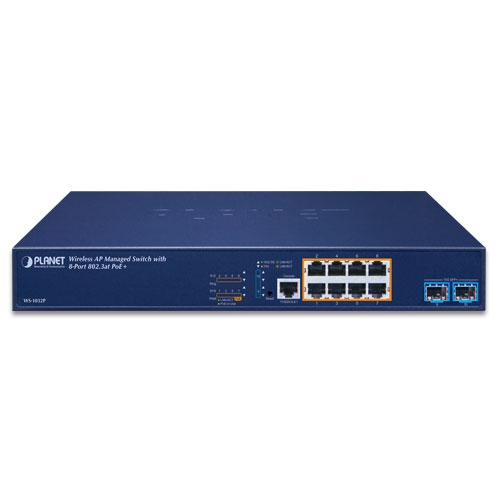
Wireless AP Managed Switch with 8-Port 802.3at PoE + 2-Port 10G SFP+

» WS-1032P

Wireless Management Solution with PoE

PLANET WS-1032P, an enhanced Wireless AP Managed Switch, features Smart AP control, Layer 3 OSPF/static routing and Intelligent PoE capability to enable service providers and IT managers to control all wireless APs at the same time in small- and medium-scale wireless network environments, such as hotels, villas, resorts and any public area. The WS-1032P provides IPv6/IPv4 dual stack management and built-in L2/L4 Gigabit Switching engine along with 8 10/100/1000BASE-T ports featuring up to 36-watt 802.3at PoE+, and 2 extra 1/2.5/10 Gigabit BASE-X SFP+ fiber slots which definitely offer enterprises a quick, safe and cost-effective AP Control with Power over Ethernet network solution.


Four Steps to Manage AP Cluster within Minutes

The WS-1032P offers a user-friendly Web GUI for easy configuration. It features centralized management of PLANET Smart AP series without needing to manually configure each AP for the wireless SSID, radio band and security settings. With a four-step configuration process, different purposes of wireless profile scan be simultaneously delivered to multiple APs or AP groups to minimize deployment time, effort and cost.


Visualizing Wi-Fi Signals through Map

Importing your floor maps and locating each AP or AP group according to the field deployment can save your time and cost of on-site support and monitoring. It shows real-time AP status, and its signal heat map is capable of reflecting the actual coverage and helps the administrator to fine-tune the overlapping of the adjacent APs anytime to optimize the wireless network performance


Maximal Scalability and Compatibility with Various Smart APs

To fulfill various business needs, the WS-1032P provides a maximum scalability and is compatible with over 10 models of Smart APs from indoor to outdoor series including ceiling-mount, wall-mount, in-wall, industrial, single-band, dual-band and high-power access points which are able to adapt to different environments.


10Gbps Ethernet Uplink for High-volume Transmission

As to the bandwidth, the WS-1032P offers 10Gbps uplink ports to relieve huge network traffic. Each of the 10G SFP+ slots in the WS-1032P supports triple speed and 10GBASE-SR/LR, 1000BASE-SX/LX or 2500BASE-X. With its 10G Ethernet link capability, the administrator now can flexibly choose the suitable SFP/SFP+ transceiver according to the transmission distance or the transmission speed required to extend the network efficiently. The WS-1032P provides greater bandwidth and powerful processing capacity to make central management more efficient.


Unique PoE Management Features

The WS-1032P has a built-in L2/L4 Gigabit Switching engine and 8 10/100/1000BASE-T ports featuring 36-watt 802.3at PoE+, with a total power budget of up to 120W for different kinds of PoE applications. It perfectly meets the power requirements of PoE Wi-Fi access points including dual-band or outdoor high-power AP/CPE with high power consumption. As a managed PoE Switch for stable and reliable wireless AP operation, the WS-1032P features the following intelligent PoE management functions:

  • PD Alive Check
  • Scheduled Power Recycling
  • SMTP/SNMP Trap Event Alert
  • PoE Schedule


Layer 3 Routing Support

The WS-1032P enables the administrator to conveniently boost network efficiency by configuring Layer 3 IPv4/IPv6 VLAN static routing manually, the RIPv1/v2 and the OSPFv2/v3 (Open Shortest Path First) settings automatically. The OSPF is an interior dynamic routing protocol for autonomous system based on link state. The protocol creates a database for link state by exchanging link states among Layer3 switches, and then uses the Shortest Path First algorithm to generate a route table based on that database.


IPv4/IPv6 Dual Stack Management Network

The WS-1032P offers IPv4/IPv6 VLAN routing feature which allows to crossover different VLANs and different IP addresses for the purpose of having a highly-secure, flexible management and simpler networking application. With the support for IPv6/IPv4 protocol, and user-friendly management interfaces, the WS-1032P is the best choice for system integrators to migrate network infrastructure from the IPv4 to the IPv6 network. It also helps SMBs to step in the IPv6 era with the lowest investment and without having to replace the network facilities even though ISPs establish the IPv6 FTTx edge network.


Optimal Redundant Ring for Faster Recovery of Managed Network

The WS-1032P supports redundant ring technology and features strong, rapid self-recovery capability to prevent interruptions and external intrusions. It incorporates advanced ITU-T G.8032 ERPS (Ethernet Ring Protection Switching) technology, and Spanning Tree Protocol (802.1w RSTP) into customer’s network to enhance system reliability and uptime in harsh environments. In a certain simple ring network, the recovery time could be less than 10ms to quickly bring the network back, thus enabling the management network to keep on operating. 


User-friendly Secure Management

For efficient management, the WS-1032P is equipped with console, Web and SNMP management interfaces. 

  • With the built-in Web-based management interface, it offers an easy-to-use, platform-independent management and configuration facility. 
  • For text-based management, it can be accessed via Telnet and the console port. 
  • For standard-based monitor and management software, it offers SNMPv3 connection which encrypts the packet content at each session for secure remote management.


Cyber security Network Solution to Minimize Security Risks

The cyber security feature included to protect the switch management in a mission-critical network virtually needs no effort and cost to install. Both SSHv2 and TLSv1.2 protocols are utilized to provide strong protection against advanced threats. The network administrator can now construct highly-secure corporate networks with considerably less time and effort than before.


Centralized AP Management for Enterprises

PLANET WS-1032P Wireless AP Managed Switch helps service providers and IT managers control all wireless APs at the same time. The WS-1032P enables administrators to effectively manage various wireless access points deployed in different locations. The administrator can automatically discover, configure, update and monitor all the managed APs through one single browser-based web user interface. Such design avoids the need to configure the wireless APs one by one.


Cost-effective PoE Management Solution with Smart AP Control

The WS-1032P, providing eight 10/100/1000BASE-T PoE ports, in-line power interfaces and two 10 Gigabit SFP+ interfaces, is capable of building a secure and highly-efficient managed wireless network for the enterprises. For instance, it can work with the RADIUS Server to perform comprehensive security for wireless user authentication with powered APs.


Physical Port

  • 8-port 10/100/1000BASE-T with 36W PoE injector
  • 2-port 1/2.5/10GBASE-X SFP+
  • RS232 RJ45 console interface for switch basic management and setup


Wireless LAN AP Management

  • Dashboard: provides at-a-glance view of system and wireless network status
  • AP Discovery: one key to discover the managed APs on the managed LAN
  • Customized Profile: allows multiple wireless profiles creation and maintenance
  • Auto Provision: multi-AP provisioning with one click
  • Cluster Management: simplifies high-density AP management
  • Zone Plan: optimizes AP deployment with actual signal coverage
  • Analysis: real-time AP status monitoring
  • Scalability: free system upgrade and AP firmware bulk upgrade capability


Power over Ethernet

  • Up to 8 ports of IEEE 802.3af/802.3at devices powered
  • Supports PoE Power up to 36 watts for each PoE port
  • Auto detects powered device (PD)
  • Circuit protection prevents power interference between ports
  • Remote power feeding up to 100 meters
  • PoE management features
    • Total PoE power budget control
    • Per port PoE function enable/disable
    • PoE admin-mode control 
    • PoE port power feeding priority
    • Per PoE port power limit
    • PD classification detection
  • Intelligent PoE features
    • Temperature threshold control
    • PoE usage threshold control
    • PD alive check
    • PoE schedule


Layer 3 IP Routing Features

  • IP dynamic routing protocol supports RIPv2, OSPFv2 and OSPFv3
  • IPv4/IPv6 hardware static routing
  • Routing interface provides per VLAN routing mode


Layer2 Features

  • High performance of Store-and-Forward architecture and runt/CRC filtering eliminates erroneous packets to optimize the network bandwidth
  • Storm Control support
    • Broadcast/Multicast/Unknown unicast
  • Supports VLAN
    • IEEE 802.1Q tagged VLAN
    • Supports provider bridging (VLAN Q-in-Q, IEEE 802.1ad) 
    • Private VLAN Edge (PVE)
    • Protocol-based VLAN
    • MAC-based VLAN
    • Voice VLAN
    • GVRP(GARP VLAN Registration Protocol)
  • Supports Spanning Tree Protocol
    • STP, IEEE 802.1D Spanning Tree Protocol
    • RSTP, IEEE 802.1w Rapid Spanning Tree Protocol
    • MSTP, IEEE 802.1s Multiple Spanning Tree Protocol, spanning tree by VLAN
    • BPDU Guard
  • Supports Link Aggregation
    • 802.3ad Link Aggregation Control Protocol(LACP)
    • Cisco ether-channel (static trunk)
    • Maximum 5 trunk groups, up to 10 ports per trunk group
    • Up to 56Gbps bandwidth (full duplex mode)
  • Provide sport mirror (many-to-1)
  • Port mirroring to monitor the incoming or outgoing traffic on a particular port
  • Loop protection to avoid broadcast loops
  • Link Layer Discovery Protocol (LLDP)
  • Compatible with Cisco uni-directional link detection (UDLD) that monitors a link between two switches and blocks the ports on both ends of the link if the link fails at any point between the two devices
  • Supports G.8032 ERPS (Ethernet Ring Protection Switching)


Quality of Service

  • Ingress Shaper and Egress Rate Limit per port bandwidth control
  • 8 priority queues on all switch ports
  • Traffic classification
    • IEEE 802.1p CoS
    • TOS/DSCP/IP Precedence of IPv4/IPv6 packets
    • IP TCP/UDP port number
    • Typical network application
  • Strict priority and Weighted Round Robin (WRR) CoS policies
  • Supports QoS and In/Out bandwidth control on each port
  • Traffic-policing policies on the switch port
  • DSCP remarking 


Multicast

  • Supports IPv4 IGMP Snooping v1, v2 and v3
  • Supports IPv6 MLD Snooping v1 and v2
  • Querier mode support
  • IGMP Snooping port filtering
  • MLD Snooping port filtering
  • Multicast VLAN Registration (MVR) support


Security

  • Authentication
    • IEEE 802.1x Port-based/MAC-based network access authentication
    • Built-in RADIUS client to co-operate with the RADIUS servers
    • TACACS+ login users access authentication
    • RADIUS/TACACS+ users access authentication
  • Access Control List
    • IP-based Access Control List (ACL)
    • MAC-based Access Control List
  • Source MAC/IP address binding
  • DHCP Snooping to filter un-trusted DHCP messages
  • Dynamic ARP Inspection discards ARP packets with invalid MAC address to IP address binding
  • IP Source Guard prevents IP spoofing attacks
  • Auto DoS rule to defend DoS attack
  • IP address access management to prevent unauthorized intruder


Management

  • IPv4 and IPv6 dual stack management
  • Switch Management Interfaces
    • Console/Telnet Command Line Interface 
    • Web switch management
    • SNMP v1, v2c, and v3 switch management
    • SSHv2, TLSv1.2 secure access
  • IPv6 IP Address/NTP/DNS management
  • Built-in Trivial File Transfer Protocol (TFTP) client
  • BOOTP and DHCP for IP address assignment
  • System Maintenance
    • Firmware upload/download via HTTP/TFTP
    • Reset button for system reboot or reset to factory default
    • Dual Images
  • DHCP Relay
  • DHCP Option82
  • User Privilege levels control
  • NTP (Network Time Protocol)
  • Link Layer Discovery Protocol (LLDP) and LLDP-MED
  • Network Diagnostic
    • SFP-DDM (Digital Diagnostic Monitor)
    • ICMPv6/ICMPv4 Remote Ping
    • Cable Diagnostic technology provides the mechanism to detect and report potential cabling issues
  • SMTP/Syslog remote alarm
  • Four RMON groups (history, statistics, alarms and events) 
  • SNMP trap for interface Linkup and Linkdown notification
  • System Log
  • PLANET Smart Discovery Utility for deployment management
  • PLANET UNI-NMS (Universal Network Management) and Smart Discovery Utility for deployment management
Hardware Specifications
Copper Ports8x 10/100/1000BASE-T RJ45 Auto-MDI/MDI-X interface with Port-1 to Port-8
SFP Ports2 x 1G/2.5G/10G BASE-X SFP interfaces with Port-9 to Port-10
PoE Injector Port8 ports with 802.3at/afPoE injector function with Port-1 to Port-8
Console1 x RJ45 serial port (115200, 8, N, 1)
Reset Button< 5 sec: System reboot
> 5 sec: Factory default
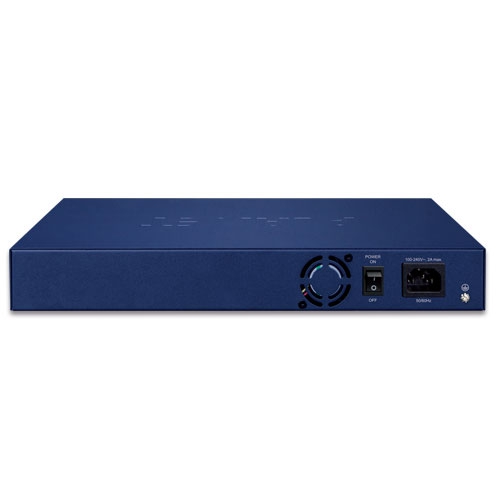
Power Requirements100~240V AC, 50/60Hz
Power Consumption (Full Loading)Max. 14.8 watts/50.47BTU (Power on without any connection)
Max. 162 watts/552.42BTU (Full loading with PoE+ function)
ESD Protection6KV DC
EFT Protection4KV
Dimensions (W x D x H)330.2 x 153 x 44mm, 1U height
Weight1.6 KG
LEDSystem:
R.O (Green), Ring (Green), SYS (Green), PWR ((Green)
10/100/1000BASE-T RJ45 Interfaces (Port 1 to Port 8):
10/100/1000Mbps LNK/ACT (Green)
PoE-in-Use (Amber)(Port 1 to Port 8)
1/2.5/10G Mbps SFP+ Interfaces (Port 9 to Port 10):
1G/2.5GLNK/ACT (Green)
10G Mbps (Amber)
Switching
Switch ArchitectureStore-and-Forward
Switch Fabric56 Gbps/non-blocking
Throughput41.67Mpps@ 64Bytes packet
Address Table8K entries, automatic source address learning and aging
Shared Data Buffer4.1Mbits
Flow ControlIEEE 802.3x pause frame for full duplex
Back pressure for half duplex
Jumbo Frame9KB
Wireless APManagement
Maximum Managed APs32
Maximum AP Groups10
Maximum APs per AP Group32
Wireless Encryption/SecurityWEP encryption security
WPA Personal / Enterprise (TKIP / AES)
WPA2 Personal / Enterprise (TKIP / AES)
Enterprise Class 802.1x
AP Auto DiscoverySupports AP auto discovery
DashboardSummarized system overview includes online AP and activated client number
SSID/RF ProfileAllows multiple wireless profiles creation and maintenance
Cluster ManagementAllows AP grouping for bulk provisioning and batch upgrading
Bulk AP ProvisioningSupports bulk AP provisioning with user-defined profiles
Bulk AP Firmware UpgradeSupports bulk AP firmware upgrade
Coverage Heat MapEnables real signal coverage of managed AP reflecting on the uploaded zone
maps
Status MonitoringReal-time traffic statistics reporting of AP and activated clients
Graphical StatisticsReal-time and historical visibility of traffic flow
Profile Backup/RestorationProvides SSID, radio profile backup/restoration
SSIDs-to-VLANs MappingAllows to configure SSIDs-to-VLANs mapping in supported APs
Supported Access Point Models[*]
Indoor APIAP-1800AX
IAP-2400AX
WDAP-C7210E(V2)
WDAP-C1800AX(V2)
WDAP-W1800AXU
WDAP-C7210E
WDAP-W1200E
WDAP-C7200E
WDAP-W750E
WNAP-C3220E
WNAP-W2200UE
Outdoor APWDAP-1800AX
WDAP-850AC
WDAP-802AC
WBS-512AC
WBS-502N
WBS-202N
WAP-552N
WAP-252N
WDAP-702AC
WBS-502AC
WBS-500N
WBS-200N
WAP-500N
WAP-200N
[*] RemarksThe supported AP models may be changed after a firmware upgrade.
Power over Ethernet
PoE StandardIEEE 802.3atPoE Plus, PSE
Backward compatible with IEEE 802.3af PoE PSE
PoE Power Supply TypeEnd-span
PoE Power OutputPer port 52V DC, max. 36watts
Power Pin Assignment1/2(+), 3/6(-)
PoE Power Budget120 watts (max.) @ 25 degrees C
100 watts (max.) @ 50 degrees C
PoE AbilityPD @ 7 watts: 8 units
PD @15.4 watts : 7 units
PD @ 30.8 watts: 3 units
Layer 3 Functions
IP InterfacesMax. 128 VLAN interfaces
Routing TableMax. 128 routing entries
Routing ProtocolsIPv4 RIPv2
IPv4 OSPFv2
IPv6 OSPFv3
IPv4 hardware static routing
IPv6 hardware static routing
Layer 2 Management Functions
Port ConfigurationPort disable/enable
Auto-negotiation 10/100/1000Mbps full and half duplex mode selection
Flow Control disable/enable
Port StatusDisplay each port’s speed duplex mode, link status, flow control status, auto negotiation status, trunk status
Port MirroringTX/RX/Both
Many-to-1 monitor
Supports up to 5 sessions
VLANIEEE 802.1Q tag-based VLAN
IEEE 802.1ad Q-in-Q tunneling
Private VLAN Edge (PVE)
MAC-based VLAN
Protocol-based VLAN
Voice VLAN
MVR (Multicast VLAN Registration)
Up to 4K VLAN groups, out of 4094 VLAN IDs
Link AggregationIEEE 802.3ad LACP/static trunk
Supports 5 trunk groups with 10 ports per trunk
IGMP SnoopingIPv4 IGMP (v1/v2/v3) Snooping, up to 255 multicast groups
IPv4 IGMP Querier mode support
MLD SnoopingIPv6 MLD (v1/v2) Snooping, up to 255 multicast groups
IPv6 MLD Querier mode support
RingSupports ERPS, and complies with ITU-T G.8032
Recovery time < 10ms @ 3 nodes
Recovery time <50ms @ 16 nodes
Supports Major ring and sub-ring
Access Control ListIP-based ACL/MAC-based ACL
Up to 256 entries
Bandwidth ControlPer port bandwidth control
 Ingress: 10Kbps~13000Mbps
 Egress: 10Kbps~13000Mbps
QoSTraffic classification based, strict priority and WRR
8-level priority for switching
 Port number
 802.1p priority
 802.1Q VLAN tag
 DSCP/TOS field in IP packet
Security Functions
Access Control ListIP-based ACL/MAC-based ACL
ACL based on:
 MAC Address
 IP Address
 Ethertype
 Protocol Type
 VLAN ID
 DSCP
 802.1p Priority
Up to 256 entries
SecurityPort Security
IP source guard
Dynamic ARP inspection
Command line authority control based on user level
AAARADIUS client
TACACS+ client
Network Access ControlIEEE 802.1x port-based network access control
MAC-based authentication
Local/RADIUS authentication
Switch Management
Basic Management InterfacesConsole; Telnet
Web browser
SNMP v1, v2c
Secure Management InterfacesSSHv2, TLSv1.2, SNMPv3
System ManagementFirmware upgrade by HTTP protocol through Ethernet network
Configuration upload/download through HTTP
Remote Syslog
System log
LLDP protocol
NTP
PLANET Smart Discovery Utility
PLANET CloudViewer app
Event ManagementRemote Syslog
Local System log
SMTP
SNMP MIBsRFC1213 MIB-II
RFC 2863 IF-MIB
RFC 1643 Ethernet MIB
RFC2863 Interface MIB
RFC2665 Ether-Like MIB
RFC2737 Entity MIB
RFC2819 RMON MIB (Groups 1, 2, 3 and 9)
RFC2618 RADIUS Client MIB
RFC3411SNMP-Frameworks-MIB
IEEE802.1X PAE
LLDP
MAU-MIB
Power over Ethernet MIB
Standards Conformance
Regulatory ComplianceFCC Part 15 Class A, CE
Standards ComplianceIEEE802.3 10BASE-T
IEEE802.3u 100BASE-TX
IEEE802.3z 1000BASE-SX/LX
IEEE 802.3ab 1000BASE-T
IEEE 802.3ae 10Gb/s Ethernet
IEEE802.3x flow control and back pressure
IEEE802.3ad port trunk with LACP
IEEE802.1D Spanning Tree Protocol
IEEE802.1w Rapid Spanning Tree Protocol
IEEE 802.1s Multiple Spanning Tree Protocol
IEEE802.1p Class of Service
IEEE802.1Q VLAN tagging
IEEE 802.1x Port Authentication Network Control
IEEE 802.1ab LLDP
IEEE 802.3af Power over Ethernet
IEEE 802.3at Power over Ethernet Plus
RFC 768 UDP
RFC 793 TFTP
RFC 791 IP
RFC 792 ICMP
RFC 2068 HTTP
RFC 1112 IGMP v1
RFC 2236 IGMP v2
RFC 3376 IGMP v3
RFC 2710 MLD v1
RFC 3810 MLD v2
RFC 2328 OSPF v2
RFC 2453 RIP v2
ITU-T G.8032 ERPS Ring
Environments
OperatingTemperature: 0 ~ 50 degrees C
Relative Humidity: 5 ~ 95% (non-condensing)
StorageTemperature: -10 ~ 70degrees C
Relative Humidity:5 ~ 95% (non-condensing)
Date Version Description Download
2021/13/081.0

WS-1032P

Download Icon
Date Version Description Download
2024/30/081.3

Added PSTI fuction.

Download Icon
2021/18/081.0

Initial release.

Download Icon
Date Version Description Download
2022/22/041.1

Initial release.

Download Icon
Date Version Description Download
2024/16/081.2103240808

Function added:
1. After the AP profile is set, the IP can change to a fixed or DHCP IP.
2. Added AP control that supports WDAP-C3000AX, WDAP-3000AX and WDAP-W3000AX.
3. Supports serial number.
4. Added PSTI function.
FW upgrade for PSTIA (Product Security and Telecommunications Infrastructure Act)
*Note: After updating the firmware, you will need to enter the product’s MAC code at the first login. Please record the MAC code before proceeding with the update.

Download Icon
2022/22/041.2103220407

AP controller support: IAP-1800AX, IAP-2400AX, and WDAP-W1800AXU.

Download Icon
2022/14/011.2103220111

(1) AP controller support: WDAP-C1800AX, WDAP-1800AX
(2) Added etherleak patch.

Download Icon

Ordering Information

WS-1032P

Wireless AP Managed Switch with 8-Port 802.3at PoE + 2-Port 10G SFP+

Ordering Information

WS-1032P

Wireless AP Managed Switch with 8-Port 802.3at PoE + 2-Port 10G SFP+

Subscribe to PLANET e Newsletter

Receive the latest product information and company news!